
Do you have a recording of two people and want to maintain its rhythm, gestures, and shots while casting new characters in the scene? In this guide, we will go from the source material and character cards to the prompt for Higgsfield Genjutsu Motion Transfer. The example is a short musical dialogue in a parked car. You will receive ready prompts, a storyboard, a result control plan, and a variant for a regular conversation.
The illustrations depict the intended effect on fictional characters; they are not frames from a tested video render. Commands like "keep exactly" express the goal, not a guarantee of model performance. The tool's functionality was checked on October 4, 2026.
What does "recast" mean in AI film?
This is the recasting of an existing shot. The source film provides body movement, gesture tempo, camera setup, length, and cut moments. Reference photos define the appearance of the new characters. Higgsfield Genjutsu describes two modes: Motion Transfer recreates movement in a new cast or environment, while Object Swap is used for more targeted replacement of elements in the existing film. In our example, we want to change two people, so we start with Motion Transfer. If you primarily care about preserving the original interior of the car, also test Object Swap and compare the results.
In practice, the model must recreate faces from changing angles, match clothing to movement, keep seatbelts in the right places, and synchronize lips with sound. This is more challenging than swapping a single stationary object. First, do a short test, then evaluate the film in motion and in still frames.
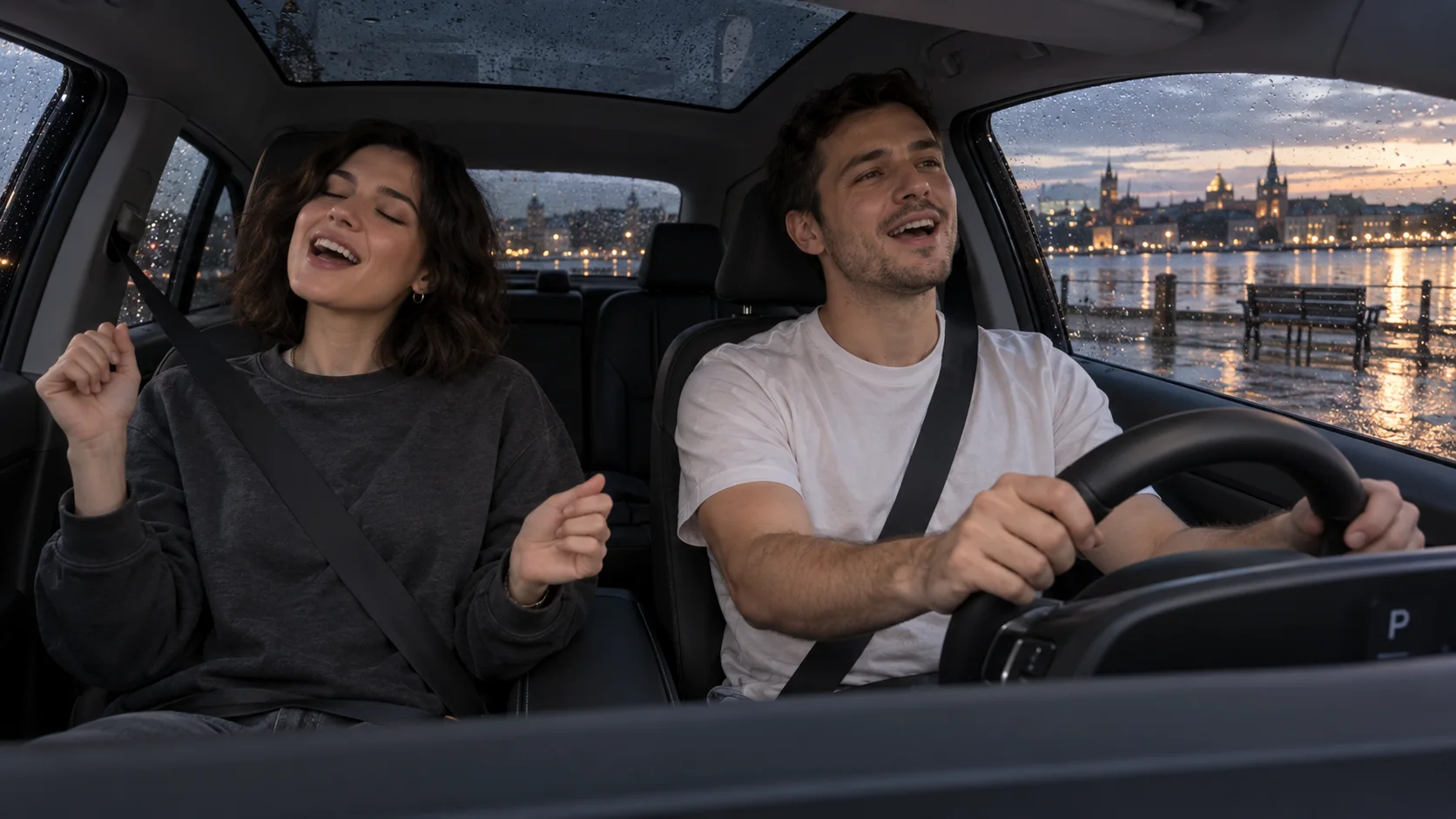
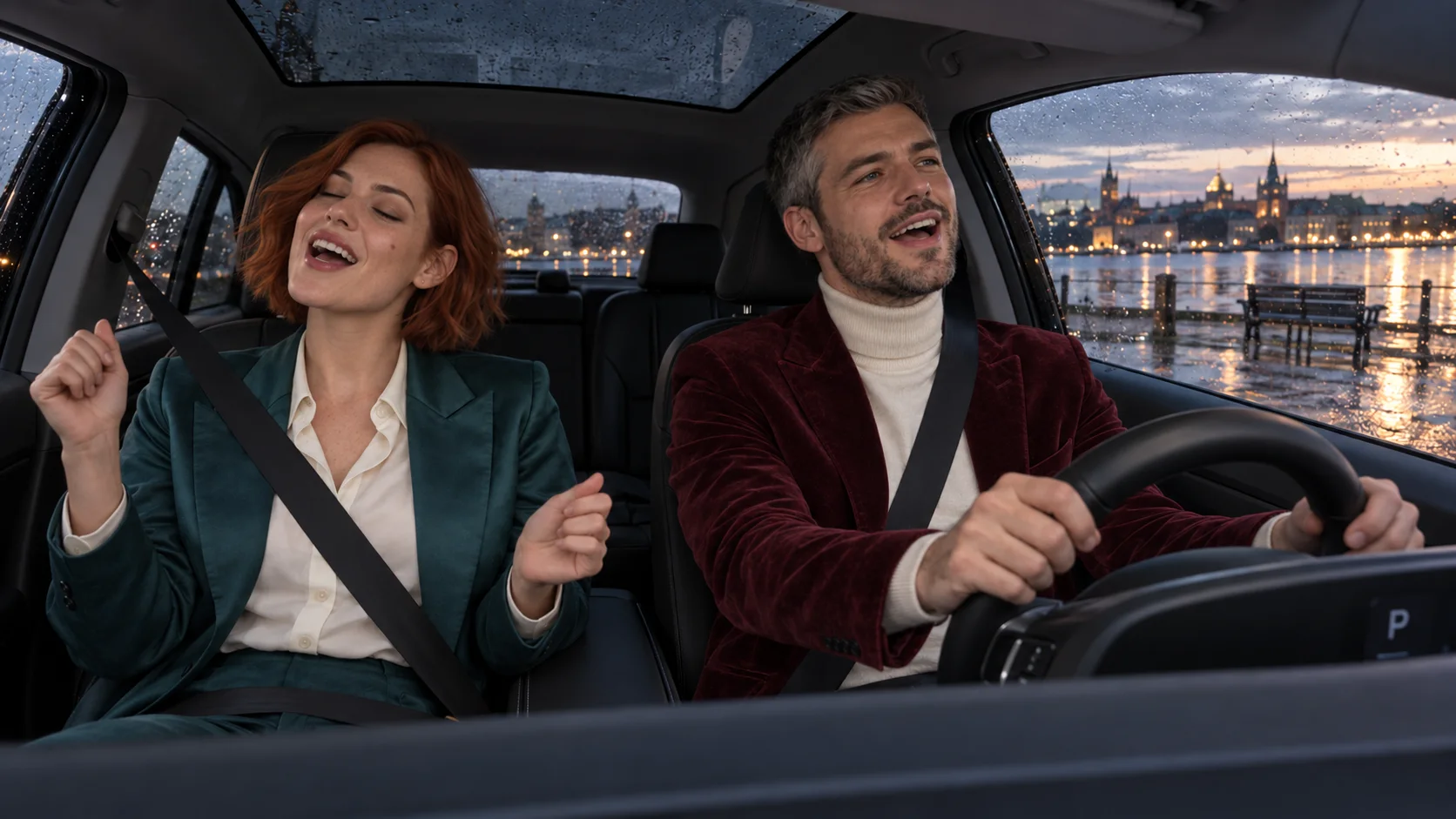
First, record good source material
For the first attempt, choose 6–10 seconds. Set your phone securely on a mount, preferably wide enough so that the entire faces, shoulders, seatbelts, and at least part of the hands of both people are visible. The light should reveal facial features; harsh flashing reflections will complicate later editing. Save the source file before compressing it through a messenger. There is no need to record a new scene specifically for each new outfit, but the more covered the face, the less information the model has to recreate.
In this example, the car is parked. Two people can freely sing a short phrase and make minor gestures. No one is driving the vehicle during the scene. If you are filming a moving car, the driver should keep attention on the road and hands on the steering wheel; dynamic gestures should be left to the passenger. Recast should not add behavior that is not present in the source material.
| Source Element | Establish Before Generation | Why |
|---|---|---|
| Frame Sides | The passenger is on the left side of the image, the driver on the right. | "Left side of the car" may mean something different with various steering layouts. |
| Camera | Fixed mount on the dashboard, one wide shot. | Fewer unknown face angles and simpler continuity control. |
| Movement | One short statement or a personal sung phrase, minor gestures. | The model can more easily maintain lips and hands than with abrupt dancing. |
| Sound | Separate copy of the original audio. | In case of artifacts, they can be layered in editing. |
| Cut | Start without a cut, then possibly one close-up. | Easier to detect the moment of change in faces, clothing, or seatbelt positions. |
Two references instead of one general description
Each person needs a separate, clear reference. Our fictional passenger has short copper hair, brown eyes, and a turquoise satin jacket. The driver has short graying hair, a short beard, and a burgundy velvet blazer. A photo from the waist up shows the face, hairstyle, and outfit in one file. If you only have a portrait, include a second image of the outfit and clearly state that it does not provide the face.
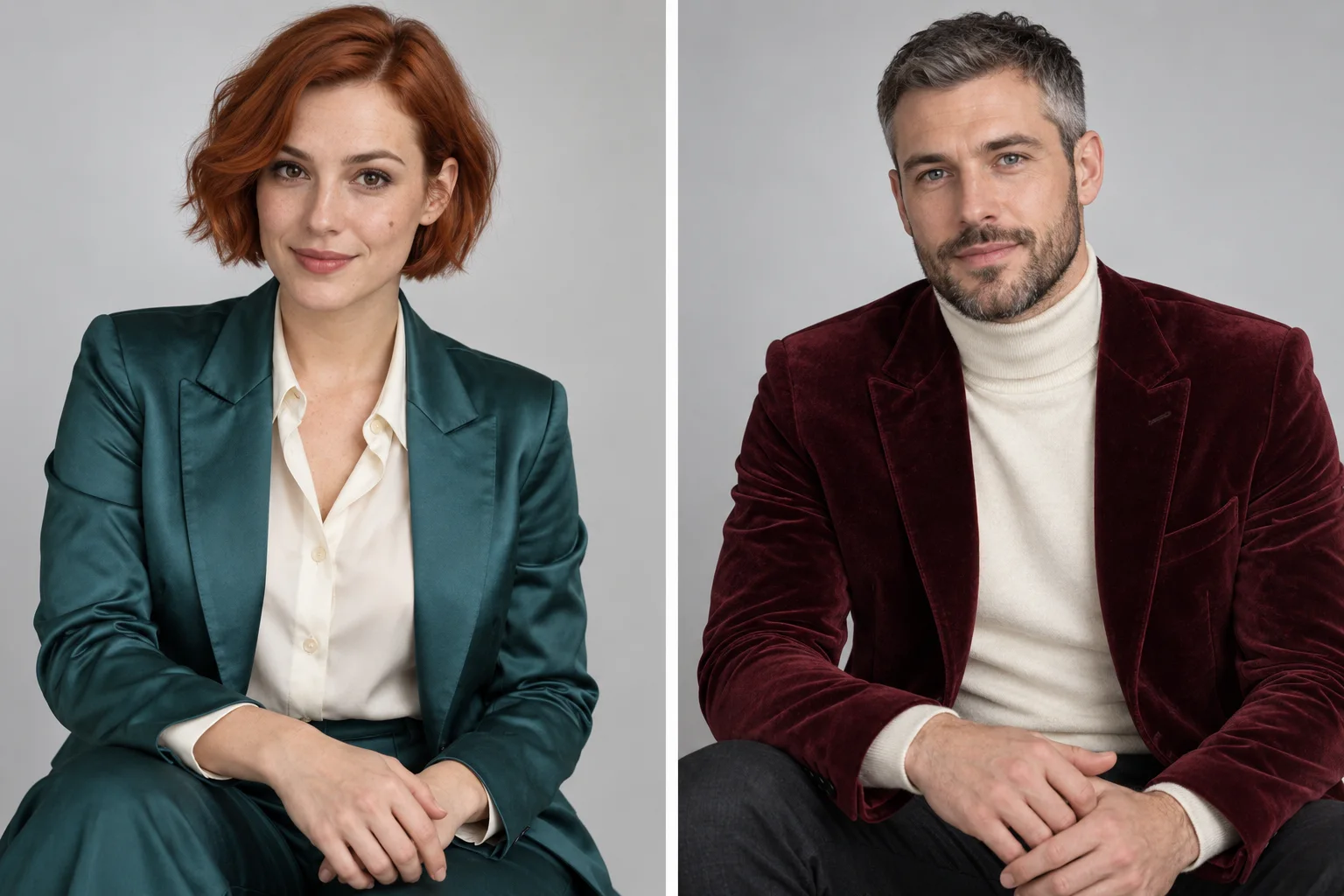
If you are working with one character board, export a separate portrait of each person. Small faces in a multi-panel grid may be less useful for the model. In the character reference card guide, you will find a complete prompt for rotations, facial expressions, and outfit descriptions.
Photorealistic reference portrait of a fictional adult woman, 28 years old, from the waist up, face at a slight three-quarter angle, both hands visible and empty. Short copper-red bob with a gentle wave, brown eyes, small mole next to the left cheek, natural skin texture. Turquoise satin jacket and light shirt, no jewelry or logos. Even soft studio light, light gray background, realistic proportions, clear face and clothing. One person, no captions, props, or alternative outfits.
Photorealistic reference portrait of a fictional adult man, 30 years old, from the waist up, face at a slight three-quarter angle, both hands visible and empty. Short graying hair, neat short beard, blue-gray eyes, natural skin texture. Burgundy velvet blazer over a cream turtleneck, no tie, glasses, or logos. Even soft studio light, light gray background, realistic proportions, clear face and clothing. One person, no captions, props, or alternative outfits.
Before using, check a couple of portraits next to each other: are the outfits easy to distinguish, do the hair not cover the face, and are there no extra hands. If a given source frame shows a profile, an additional profile of the same person will be useful, but start with a simple set of two photos.
Prompt for Genjutsu Motion Transfer
In Higgsfield, select Genjutsu and Motion Transfer. Upload the clip as @Video 1, the passenger's portrait as @Image 1, and the driver's portrait as @Image 2. The labels in the interface may vary: before generation, check the thumbnails and order of files. The official description of Genjutsu states that the source video should be 3–30 seconds long; check available quality settings and the cost of a specific run in the panel before confirming.
Use @Video 1 as the source of movement and timing. This is a short performance of two adults in a parked car, recorded with a stationary camera on the dashboard. Cast the same scene with two fictional characters. Do not create new choreography.
MAP: the person in the passenger seat, on the LEFT side of the image, has the appearance from @Image 1: short copper bob, brown eyes, small mole next to the left cheek, turquoise satin jacket, and light shirt. The person in the driver's seat, on the RIGHT side of the image, has the appearance from @Image 2: short graying hair, short beard, blue-gray eyes, burgundy velvet blazer, and cream turtleneck. Do not swap the people or mix facial features or clothing.
Maintain the order of gestures, direction of gazes, rhythm of speech, lip movement, length of the clip, stationary camera, width of the frame, interior of the same car, rain on the windows, and evening view of the waterfront. Two seatbelts remain visible, running in front of the new clothing and maintaining logical placement with body movement. The driver keeps hands on the steering wheel as per the source film. The new clothing reacts to movement naturally, without jumps between frames.
Keep the original sound if the selected editing option transfers it. Do not add new music, dialogue, logos, or text. Do not change the camera setting, seating arrangement, direction of hand movements, or moments of action. The same two new faces from the first to the last frame, realistic skin, and consistent lighting with the car's surroundings.
This is a deliberately specific but not overly long prompt. The first paragraph establishes the task; the map assigns the characters; subsequent sentences block elements that are easy to confuse. If the tool does not support transferring the original sound, download the image result and layer the previously saved audio track in the editor. Check synchronization before publishing the film.
Storyboard: Plan Control at Eight Moments
The storyboard does not need to be a separate image generated by AI. You can pause the source at eight points and note what is happening on screen. This is a better basis for control than a nice grid where gestures do not match the recording. An example for your own clip of eight seconds:
| Time | What is Visible | What to Check in the Result |
|---|---|---|
| 0.0 s | Both people visible, camera stationary. | Correct faces on the correct sides. |
| 1.0 s | The passenger starts the phrase. | Lips and micro-expressions do not freeze. |
| 2.0 s | The passenger raises a hand. | Sleeve, fingers, and seatbelt remain logical. |
| 3.0 s | The driver reacts with a gaze. | Head changes angle, face remains the same. |
| 4.0 s | Both people in one frame. | They have not swapped features or places. |
| 5.0 s | Short shared phrase. | Lip movement of the two people is not an identical copy. |
| 6.5 s | The passenger rests a hand. | The hand does not penetrate the seat or seatbelt. |
| 8.0 s | End of gesture and clip. | Outfit, interior, and both faces remain consistent. |
If you need a visual board for the crew, create it after watching the source film. The prompt below helps organize frames, but generated images are a draft, not proof that exactly those frames occur in the video.
Based on the attached source frame and separate portraits of the two fictional characters, prepare a horizontal board 4 × 2 with eight frames in a 16:9 ratio. In each frame, the same parked car, stationary camera on the dashboard, passenger on the left side of the image, driver on the right, both with seatbelts. Maintain identity and outfits from the portraits. Show only the eight action states listed below: [INSERT EIGHT ACTUAL MOMENTS FROM THE SOURCE HERE]. Maintain the order of time, car interior, rain outside the windows, and direction of light. White spaces between panels, no captions or additional people. Do not add gestures that are not in the source film.
If you only want to change clothes or just one person
There is no need to do a full recast right away. In Genjutsu Object Swap, specify one object or one character and provide a reference for it. One change per sentence makes it easier to evaluate the effect. For example:
In @Video 1, change only the adult passenger sitting on the left side of the image to a fictional person from @Image 1. Maintain her position, scale, gestures, and timing of speech. Her seatbelt remains on top of the clothing and moves naturally. The driver, car interior, rain, camera, length, editing, and sound remain as in the source material.
Check which mode better holds the rest of the scene. The product description distinguishes between Motion Transfer and Object Swap, but in a complex two-character frame, neither mode exempts you from result control.
Quality Control: Watch the Film Three Times
- Without sound: track faces, hands, hair edges, seatbelts, and clothing. Pause the image at head turns, hand placements on the face, and stronger gestures.
- Sound only: listen for any missing phrases, repeated syllables, or new voices. Compare the length with the source.
- Together: check if the beginning and end of each statement match the lips of the correct person. Ensure that one person is not "singing" with the voice of another.
The most common errors have specific fixes. When characters swap places, add the side of the image and clothing color for each person in the map. When a seatbelt disappears, use a source frame with clearly visible seatbelts and repeat the block in the prompt. When a face changes during a turn, prepare an additional reference of three-quarters of the same person or shorten the test segment. When audio does not match, use the original track in the editor; if lips still misalign, fix the image segment itself instead of masking the problem with music.
If the source has a cut to a close-up, enter its exact time in the prompt and check a few frames on both sides. Such editing usually reveals the most significant change in facial geometry. For the first attempt, one stable shot provides a clearer diagnosis.
Variant Without a Car: Conversation at the Table
This method is not tied to a car or singing. Two people can talk at a table, pass a product, or react to a joke. Swap the location map to "person closer to the window" and "person closer to the lamp," and the seatbelts for a relevant prop. Just change the part describing the scene; maintain the order of references, information about movement, length, and conditions for controlling faces and sound.
@Video 1 sets the exact rhythm of the conversation, gestures, camera setup, and timing. Swap only the person by the window for the character from @Image 1, and the person closer to the lamp for the character from @Image 2. Do not swap their places or move clothing elements between them. Maintain the table, cups, direction of light, gesture of passing the cup, and original soundtrack. No new sentences, people, props, or cuts.
Limits of the Method and Publication
Use your own film or material for which you have the appropriate rights, and character references that you can use. If you are replacing a recognizable real person, obtain permission to use their likeness; do not present a synthetic performance as their authentic statement or endorsement. For a sung segment, your own recording and your own backing track most easily resolve the issue of music rights. Keep the source, references, and version of the prompt next to the export so that you can return to a specific attempt.
A good first experiment is eight seconds, two clear references, and one shot. If you want to better prepare faces and outfits, start with the AI character card. More about editing individual elements can be found in the Genjutsu Object Swap guide, and about new locations and camera angles in the Genjutsu and Seedance guide.
Comments (0)
No comments yet. Be the first!