
Bigfoot walks down a forest path, glances at the camera, and says exactly what you write. Such a film can be made today without costumes and a crew: prepare one cohesive character image, turn it into a short video with sound, and then edit the best shots. Below, we show a simple path for beginners, a variant with your own voice, and prompts that can be immediately adapted to your own story.
Three original illustrations in this guide show the planned appearance of a fictional character; they are not frames from a finished film. Generators can confuse words, lips, or leg movements, so each result must be watched and listened to. The tool features were checked on October 4, 2026.
Where to Start: One Clip or a Whole Series?
For your first film, plan one scene lasting 6–8 seconds: the hero takes two or three calm steps, looks at the camera, and utters one short sentence. This is enough to check the character's appearance, gait, voice, forest sound, and lip synchronization. A long speech, a quick run, a 360-degree turn, and several frame changes in one prompt give the model too many tasks at once.
The version we recommend for the first attempt uses Higgsfield and the Seedance 2.5 model: character image + movement description + short line can create video and sound in one go. The official model description lists image, text, and sound as inputs and generating synchronized audio. If you care about precisely defined sound and exact words, prepare your own voice recording and use it as an audio reference or use a lip-syncing tool after generating the image. Access to models, clip length, and cost depend on the current account; check them before generation.
| Goal | Simplest Path | When to Change Approach |
|---|---|---|
| Short, impactful scene with voice | Image → Seedance 2.5 with sound. | When the sentence is twisted or lips do not match. |
| Accurate Polish statement and own voice | Record voice → use it as an audio reference if the mode supports it. | When lip movement still does not match: correct the talking shot in Lipsync Studio. |
| Series of films with the same Bigfoot | Keep the portrait, feature description, bag, and approved frame. | When the face changes between clips: attach an approved reference to each shot. |
1. Design a Character That Is Easily Recognizable Again
Establish a few features that can be visually checked: fur color, facial features, a specific detail, and one prop. Our fictional hero has chestnut-brown fur, lighter eyebrows, amber eyes, and a green canvas bag slung over their shoulder. The bag makes it easy to notice whether the next shot shows the same character. Do not include dozens of ornaments that the model will have to keep in motion.
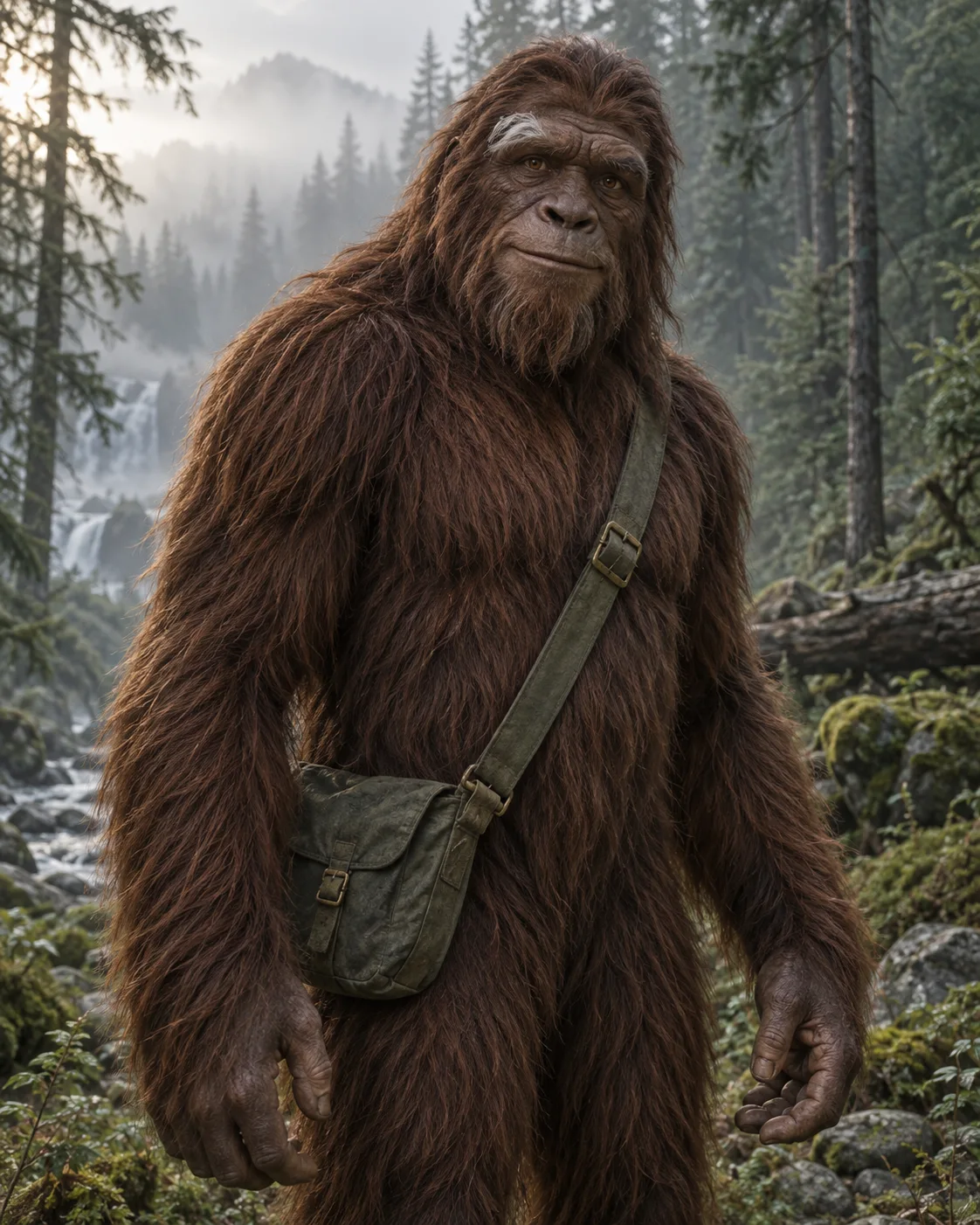
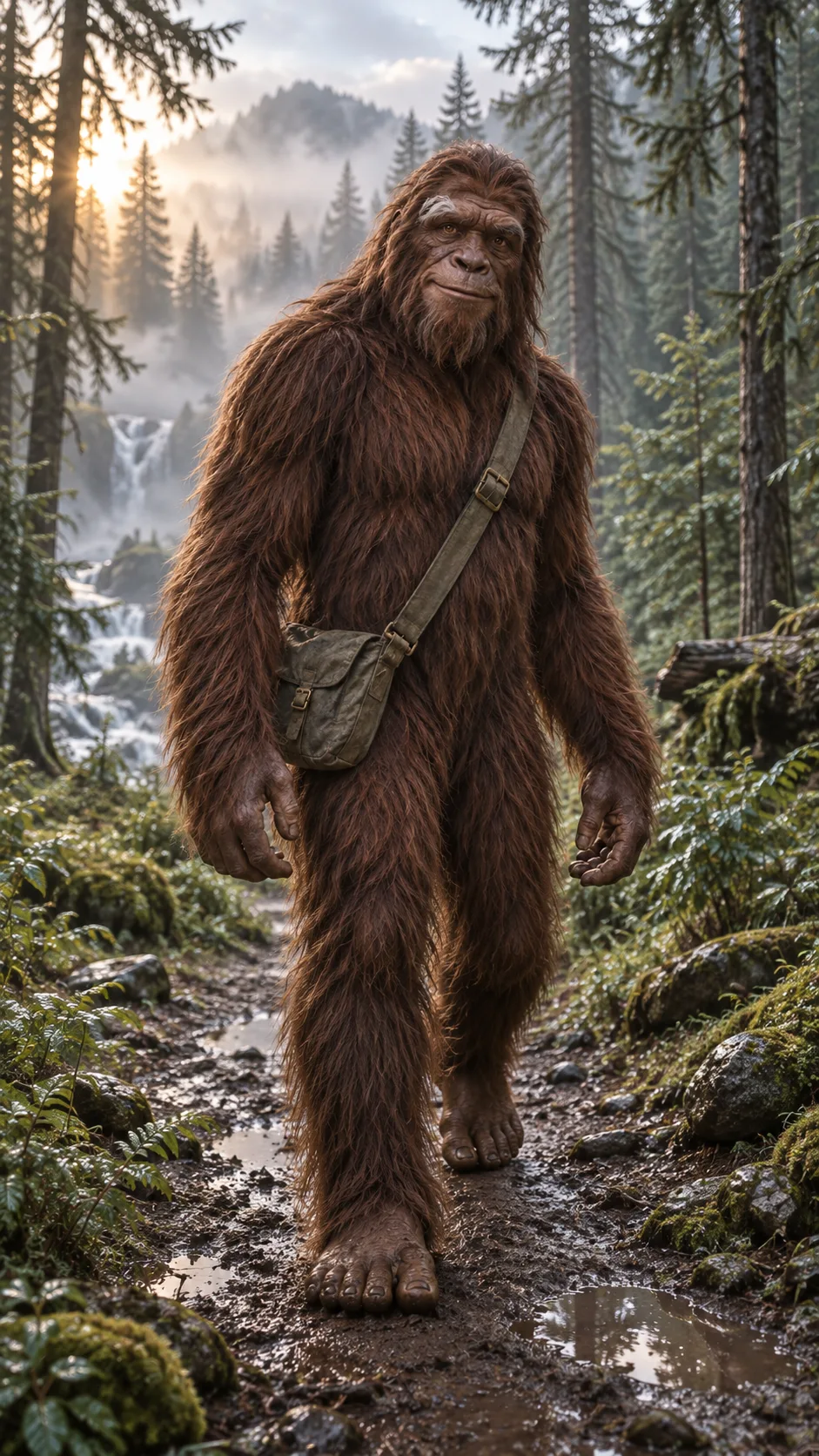
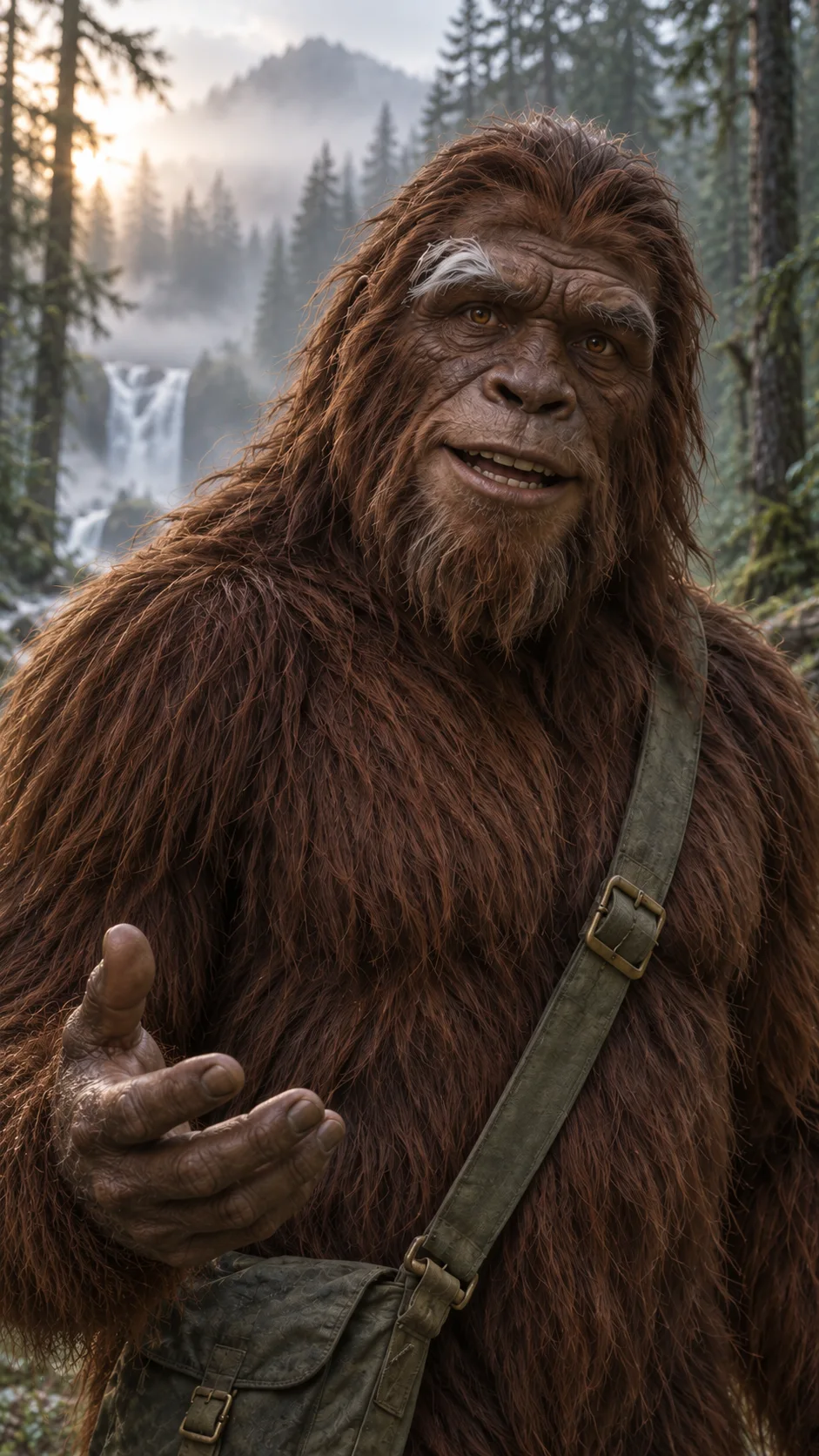
Vertical realistic shot 9:16 for a short film. A friendly, fictional adult Bigfoot walks down a forest path at dawn. Very tall, broad shoulders, long arms, chestnut-brown fur, lighter eyebrows, amber eyes, a characteristically human-expressive face with clear lips. An old green canvas bag with a brass buckle slung over the shoulder. The entire silhouette from the top of the head to large bare feet fits in the frame. One foot stands on the wet ground, the other begins to step. Soft fog among the spruces, cool morning light from the left, gentle warm glow behind the trees, natural wet stones. Nature documentary film, realistic texture of fur and skin. No text, logo, other creatures, horror, or additional clothing. Leave some space above the head and below the feet.
Select one successful version. Save the vertical full-body image as the first shot of the walking film; keep the face portrait as a separate reference for close-ups. Do not change the fur color or bag in subsequent prompts. If you plan multiple episodes, also prepare a view of the character at a three-quarter angle. We explain this in more detail in the character reference guide. Labels like “do not change the face” help, but do not guarantee identity with each generation.
2. Write the Line for the Film
One short thought sounds more natural than a hurried monologue. In the first attempt, use about 8–12 words. Our example: “I lost the map. Fortunately, the forest remembers the way.” The sentence has two phrases, a small pause, and makes sense even without prior context. You can replace the text with your own joke, anecdote, or advice. Also establish who speaks: only Bigfoot. No narrator or off-screen voices unless you consciously need them.
The voice description should be simple: low, warm, slightly rough, friendly, speaking Polish at a natural pace. An overly low “monstrous” bass can be unintelligible. Leave a short breath before and after the statement. When the statement must be literal, record it yourself on your phone in a quiet room. Speak clearly, but not like a commercial voiceover. If you are using a ready voice generator, listen to Polish phonemes and check the usage rules of the selected sample; do not copy someone else's recognizable voice without permission.
3. First Film: Walk and One Sentence in Seedance
In Higgsfield, go to Video and select Seedance 2.5 if it is available on your account. Add the approved image as the first shot or character reference according to the current interface. Enable sound generation, set 9:16, and short clip. For trials, choose the lowest available resolution; reserve the higher one for the approved idea. With each render, check the cost visible in the generation button.
Use the attached image as the first shot and reference for the appearance of one fictional Bigfoot. Vertical film 9:16, 8 seconds, one continuous shot. Keep the chestnut-brown fur, lighter eyebrows, amber eyes, face with clear lips, and old green bag with a brass buckle. Do not add other characters.
0–2 seconds: the hero walks on a wet forest path towards the camera, taking two calm steps with visible contact of feet with the ground. The camera slowly pulls back at chest height, keeping the entire silhouette. The bag moves in accordance with the step.
2–7 seconds: the hero slows down, finds the lens with their gaze; the shot transitions to a stable medium shot from the waist up through natural camera movement. They say in Polish exactly once: “I lost the map. Fortunately, the forest remembers the way.” They speak calmly, in a warm low and slightly rough voice, at a natural pace. The lips and jaw move with the words. One hand makes a small gesture towards the path. Let the sentence finish before the end of the clip.
7–8 seconds: a short friendly smile and breath. You can hear their steps on the wet ground, a distant waterfall, and subtle birdsong; the voice remains understandable. The sound of the forest does not drown out the words. No narrator, second voice, music, subtitles, cuts, teleporting, sudden zooms, or changes in character appearance. Natural morning light and moderate fog throughout the clip.
If the model misinterprets the transition from the full silhouette to the face, split the film into two shots: 3–4 seconds of walking without dialogue, and then 5–6 seconds of speech in a closer shot. Combine them in the editor on a pause before the word “I lost.” This is easier to correct than repeatedly generating one complex clip. You can also maintain a medium shot for the entire 8 seconds and let the character walk slowly while speaking; then the feet do not need to be visible.
4. When You Want Exactly This Voice and Exactly These Words
First, record the voice and listen to it without the image. Remove mistakes, leave natural pauses. If the Seedance mode allows adding an audio file as a reference, provide it with the sound role and request lip matching. According to Higgsfield documentation, Seedance supports audio references and lip sync; check the availability of the field and file limits in the mode you are using.
@Image 1 is the appearance of the fictional Bigfoot and the first frame of the scene. @Audio 1 is the only voice and exact statement; keep its words, order, pauses, and timing. The hero walks slowly along the path, and when they speak, their clearly visible face remains in a medium shot. Match the lip and jaw movement to @Audio 1, without additional words and without changing the voice tone. Under the sound, a gentle rustle of the forest, but not drowning out the statement. Keep the appearance of the face, fur, and green bag from @Image 1. One continuous shot, vertical 9:16, without subtitles and music.
If you already have a good film, but the lip movement does not match the recorded voice, check Lipsync Studio. The tool accepts an image or existing video, depending on the selected model. The video-to-video variant is suitable for correcting a ready talking shot. Test on a short segment where the lips are large and not covered by fur, hand, or edge of the frame. Then check if the face has not changed apart from the lips.
5. How to Make a Really Nice Image and Credible Sound
Light: choose one time of day. A misty morning with soft light helps retain details of dark fur; a random mix of harsh sunlight, neon lights, and moonlight will hinder consistency. In the prompt, specify where the light comes from and which parts of the character it covers.
Frame: a wide shot shows that the character is really walking, but does not allow for good lip reading. A medium shot gives the voice a face. In a phone film, leave some space at the edges for the app interface and possible subtitles. If you want to better understand the width of the frame, see our guide on focal lengths and framing.
Movement: two slow steps are more interesting than a continuous aimless march. Record the beginning, middle, and end of the movement. One natural camera correction from the hand can look credible; many camera movements at once distract from the hero.
Voice and Background: the words must be louder and clearer than the waterfall, wind, and footsteps. Listen on the phone speaker, not just in headphones. If the forest noise sounds like a loop or the voice jumps between sentences, use your own track and gently mix the ambience in the editor. You do not need music in every clip; often natural footsteps and silence sell the scene better.
Three Ready Ideas for the First Episode
| Idea | Short Line | Image and Sound |
|---|---|---|
| Diary from the Forest | “Today I found a path that wasn’t here yesterday.” | Misty morning, tracks in the mud, quiet footsteps. |
| Joke to the Camera | “They say it’s hard to find me. I just wake up early.” | Medium shot, slight smile, birds in the background. |
| Mini Story | “I lost the map. Fortunately, the forest remembers the way.” | Two steps, looking at the lens, waterfall far behind the character. |
Select one idea and prepare at most three attempts. After each, change one thing: reference, length of the statement, or camera description. If you modify everything at once, it will be hard to determine why the result improved.
Why Didn’t the Film Turn Out? Quick Diagnosis
| Problem | What to Fix First |
|---|---|
| The character speaks with an off-screen narrator's voice. | Add “speaks exclusively the visible hero; no narrator” and use a closer shot. |
| The statement is cut off. | Shorten the sentence or lengthen the clip; leave a second for a breath before the end. |
| Lips do not match the Polish voice. | Use your own recording as an audio reference or correct the shot itself in Lipsync Studio. |
| Feet slide on the ground. | Reduce the number of steps, simplify camera movement, and show foot contact with the ground. |
| The face or bag changes between shots. | Return to one approved character image and repeat constant features in each prompt. |
| Forest sounds drown out the dialogue. | Lower the background in editing or generate a clip with fewer sound effects. |
Editing and Publishing
Keep the original character image, voice file, prompts, and exports in one folder. In the editor, set 9:16, combine the walking shot with the spoken shot with a hard cut, and check that the bag and direction of light do not jump. Add subtitles only after checking the text of the statement; automatic transcription may miswrite Polish words. Watch the finished film on your phone with sound and without sound. Especially check the first second, as it determines whether the viewer understands what they are watching.
If you want an alternative, Google Flow with Veo 3.1 also combines image, references, and generated sound; the layout of features and availability may vary depending on the account and region. Choose one tool for your first attempts, and only after obtaining a good frame compare models. The biggest difference usually comes from clear face, short text, and well-chosen first image, not an increasingly longer prompt.
Comments (0)
No comments yet. Be the first!