
The cinematic character of a shot does not begin with a filter. It arises from the direction of light, the relationship between warm and cool colors, contrast, camera work, and the moment of cutting. In this guide, you will create a short scene with your own visual style from a single ordinary phone recording while preserving the expression and meaning of gestures.
The illustrations are original visualizations of the effect, not frames from a finished film. The tool features were tested on October 4, 2026.
Starting Point: Honestly Recorded Material
Imagine a 12-second statement in the kitchen. One window on the left, a mug in hand, cabinets and a steel kettle in the background. The phone is standing still. We do not add a filter during the recording because the model should recognize the true edges, skin texture, and direction of light.
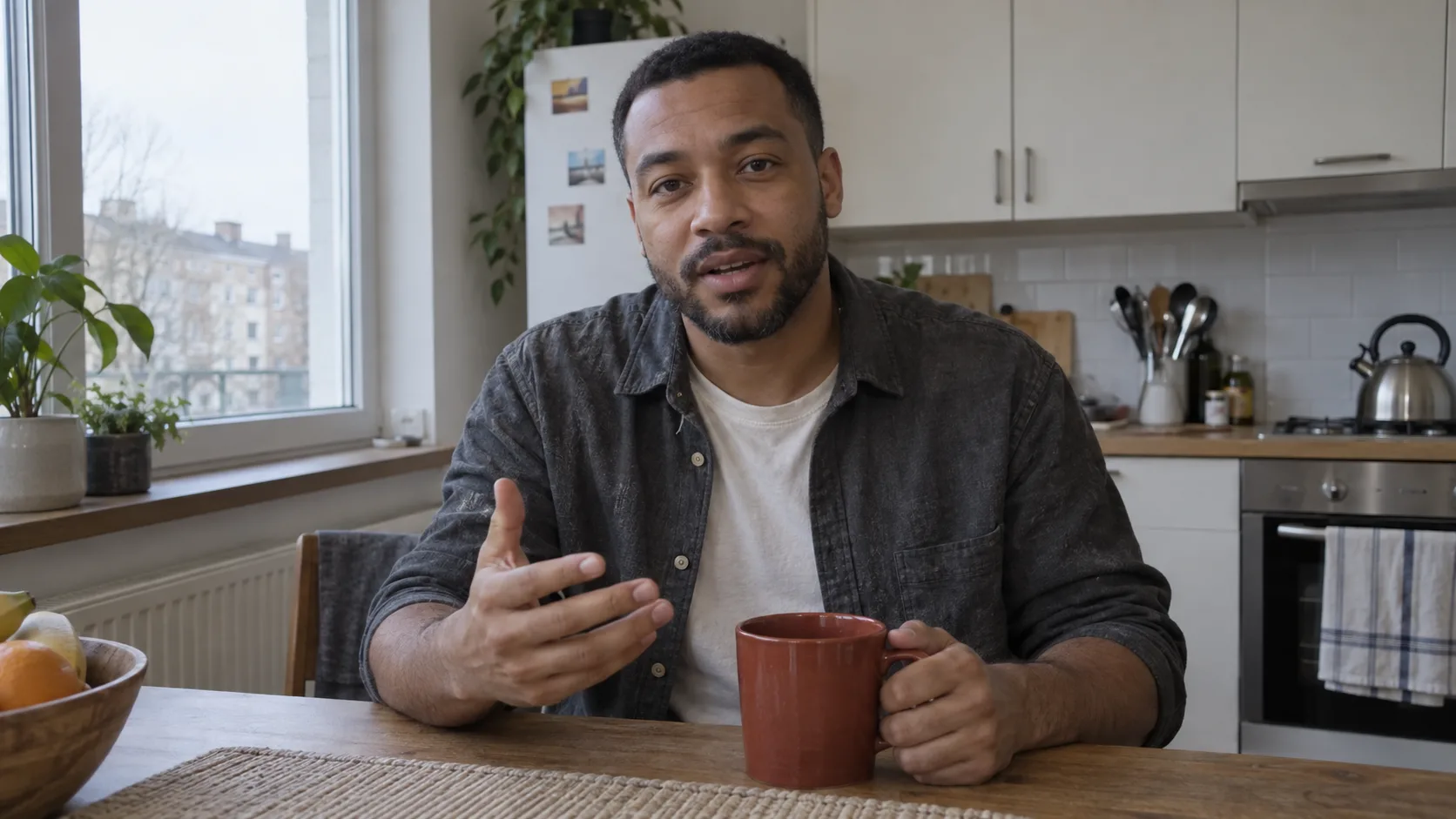
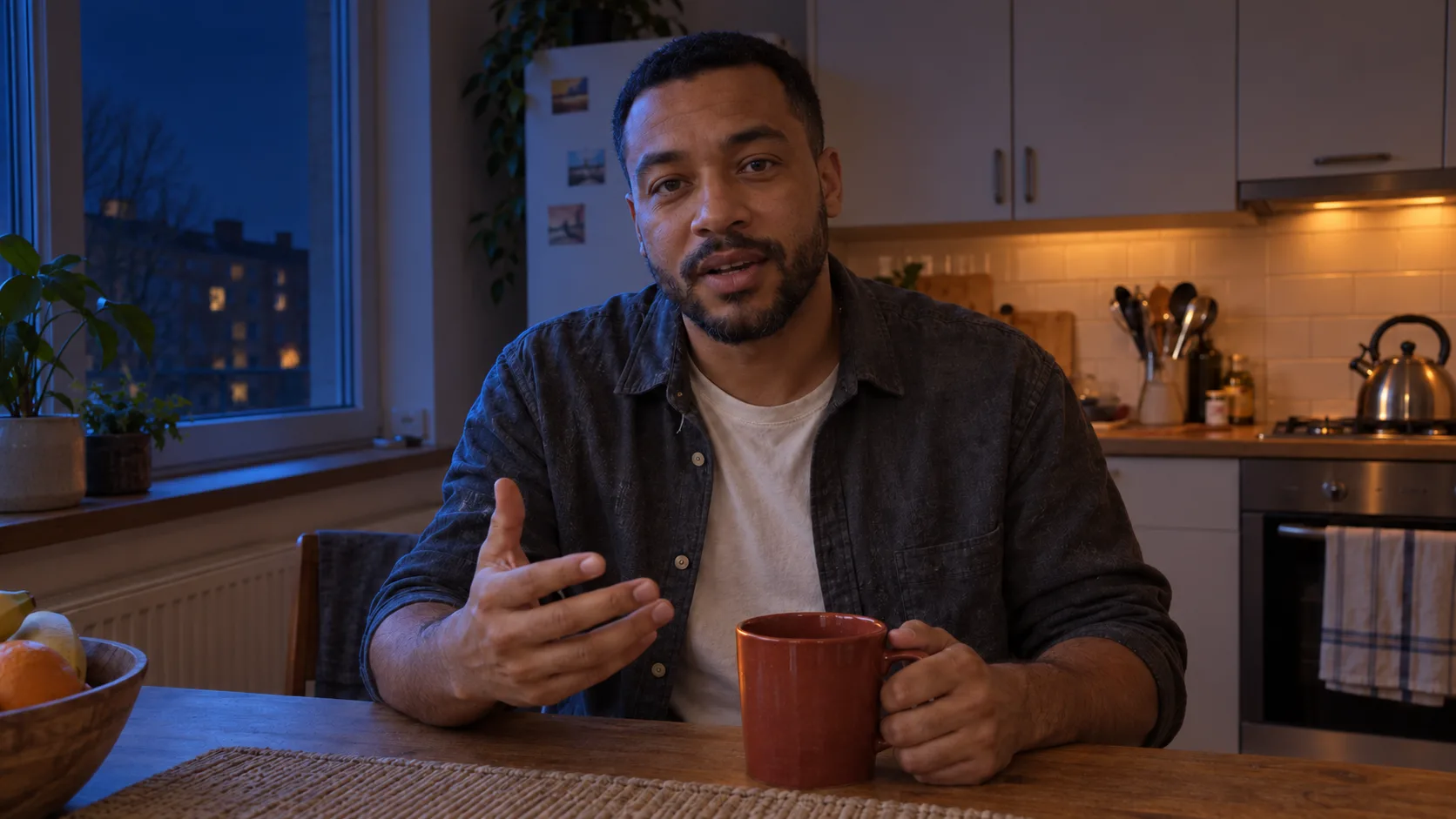
The scene after the change does not copy a specific film or director. It is your own concept: navy twilight outside the window, warm reflection on the face, darker cabinets, and subtle graininess. Such a description is more useful than "make it cinematic."
Break Down the Look into Eight Decisions
| Element | Question Before Writing the Prompt | Our Decision |
|---|---|---|
| Source | Where is the light coming from? | Window on the left, warm lamp off-frame on the right. |
| Direction | Which side of the face is brighter? | Left cooler, right with warm reflection. |
| Temperature | How to separate the colors? | Indigo and copper, without a blue tint on the entire skin. |
| Contrast | What should disappear in the shadow? | Back of the kitchen darker; eyes still readable. |
| Exposure | Where should the detail remain? | Face and mug, without blown-out spots. |
| Materials | How do specific objects change? | Steel captures cool reflections, wood remains warm. |
| Optics | How much grain, blur, glow? | Moderate grain, very light glow near the lamp. |
| Atmosphere | What is the feeling of the scene? | Silence and focus, without smoke and random props. |
You do not need to know technical names. Describe what is happening with the existing kitchen: the window shows a darker sky, wooden fronts catch a copper reflection, metal is cooler. This way, the light looks like part of the room, not a colored filter applied to the entire frame.
Plan Cuts with Words
Listen to the recording and note the moments when a new thought begins. For 12 seconds, three shots will suffice. The first shows the person and the place, the second brings us closer to the gesture, the third allows us to see the reaction. The cut should occur at the beginning of a phrase or a short pause. With each new shot, the performance must continue without repeating the hand movement.
| Time | Camera | What Should Be Readable |
|---|---|---|
| 0–3 s | Medium shot, slightly from the side, calm camera | Window, mug, face, and light arrangement. |
| 3–7.5 s | Medium close-up, very slow lateral movement | Movement of the mug and the second part of the sentence. |
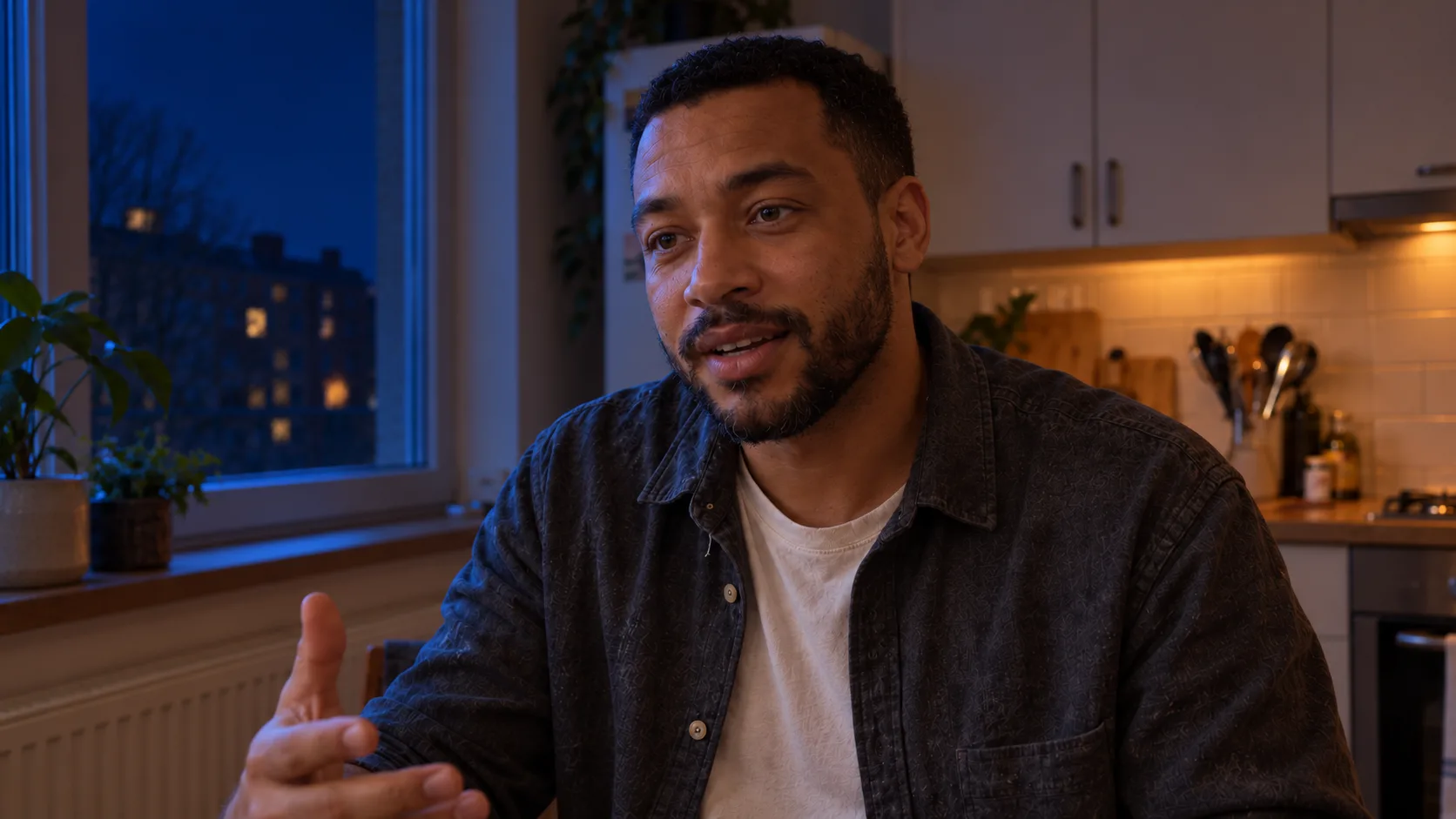
| 7.5–12 s | Close-up without movement | Eyes, facial expression, last words. |
One Prompt for Image Editing
Upload the film to video editing mode, for example, Seedance 2.5 Edit in Higgsfield, if available in your plan. Before starting full generation, try a short segment. The model may not accurately preserve the face or sound; keep the original audio in a separate file for possible overlay in the editor.
Edit @Video 1. It is still the same adult person, the same kitchen, and one continuous statement. Preserve the order of words, gestures, lip movements, facial expressions, clothing, mug, and duration. Do not add people or objects. The original sound must remain continuous throughout all cuts.
Change the lighting of the entire scene to evening: the window on the left provides soft navy light on the left cheek and steel kettle; the existing warm lamp on the right gives a subtle copper reflection on the skin, mug, and wood. The cabinets in the background become darker, but the face and eyes remain readable. Natural skin texture, moderate fine grain, delicate glow only at the brightest reflection. The same arrangement of light and colors in each shot. No uniform blue overlay.
0–3 s: medium shot, slightly from the left, visible window and mug. 3–7.5 s: hard cut to medium close-up from the right, very slow lateral movement, mug remains in hand. 7.5–12 s: hard cut to a stationary close-up of the face, eyes sharp. Each shot corresponds to the appropriate moment of @Video 1. The gesture does not restart after the cut. No additional statements, music, subtitles, slow motion, or transitions.
Quality Control and Common Fixes
- The face is too smooth: add "visible pores and minor skin irregularities" and reduce the glow.
- The entire image is blue: describe the window, lamp, skin, metal, and wood separately. Do not ask for a "blue filter."
- The gesture repeats after the cut: reduce the number of shots, move the cut to a pause, and add the moment of the gesture.
- The voice or lips do not match: compare the source track, overlay it in editing, and correct synchronization; if the image also drifts, generate a shorter segment.
- New angles reinvent the kitchen: choose shots closer to the source and note the fixed positions of the window, cabinets, and lamp.
If you primarily care about changing the room, see our guide on one recording in multiple places and shots. And if you do not know the difference between a wide shot and a close-up, start with a simple explanation of focal lengths.
Comments (0)
No comments yet. Be the first!