
Two hands hover beside a piece of pastry. They spread apart, and the pastry elongates into an eclair. Moments later, it glistens, opens, gets filled with cream, and receives a shiny glaze. Such an advertisement looks like a gesture-controlled pastry show. Here, we will break it down into images, movement, sound, and quality control–so you can create your own version, even for a different dessert.
The three illustrations below were created for this guide. They show the planned frames, not frames from a finished film. We have not tested the final video render here, so the described prompts are a starting point for experimentation, not a guarantee of a specific outcome.
Concept and Its Limits
In a real pastry shop, choux pastry is piped into elongated portions, baked, and the finished shell is filled and decorated. In our advertisement, the eclair levitates, hands do not touch it, and the baking lasts a fraction of a second. This is a deliberate CGI fantasy. Credibility is built by material details: the raw dough is moist and elastic, the baked shell has pores and flaky edges, the cream is thick, and the chocolate flows heavily. Do not call the instant baking “realistic physics”; rather, ask for believable textures in an unreal transition. The actual order of preparing eclairs is shown in the King Arthur Baking description.
The most challenging element is not the eclair itself. It is continuity: the two hands should remain on their sides of the frame and never touch the food; one shell must maintain its length after opening; the cream must go inside, and the glaze on top. The more of these changes you pack into ten seconds, the easier it is to have extra fingers, disappearing halves, and chocolate flowing upstream.
First, Establish Fixed Elements
| Element | Decision in Our Example | What to Control |
|---|---|---|
| Product | One elongated eclair made from choux pastry, vanilla cream, and dark chocolate. | The same length, number of halves, and direction of the dessert throughout the film. |
| Hands | Two hands in matte graphite gloves, on the left and right sides of the image. | No third hand, no swapping sides, and no contact with the dessert. |
| Scene | Warm, light cream-colored studio background; dessert suspended in the air. | Consistent background color and one level of the product, without sudden tables or ovens. |
| Light | Soft light from above left and a gentle warm edge from the back. | The same side of the reflection on the cream, chocolate, and gloves. |
| Camera | Fixed point of view, close shot of the entire dessert and both hands. | Nothing important goes beyond the edge; no accidental zooming. |
The entry “hands 15–25 cm from the food” can help as a guideline, but the generator does not measure distances with a ruler. More important is a clear gap between the fingers and the dessert in every frame. If a hand obscures the end of the eclair, the model may think it has grabbed it.
Three Images That Organize the Transformation
Before you start the video, prepare and approve three still frames. The first establishes the shape of the raw dough and the position of the hands. The second shows the baked, opened shell and the cream. The third is the target shot of the product. This set provides a reference point for corrections; it alone will not make the model generate perfect transitions.
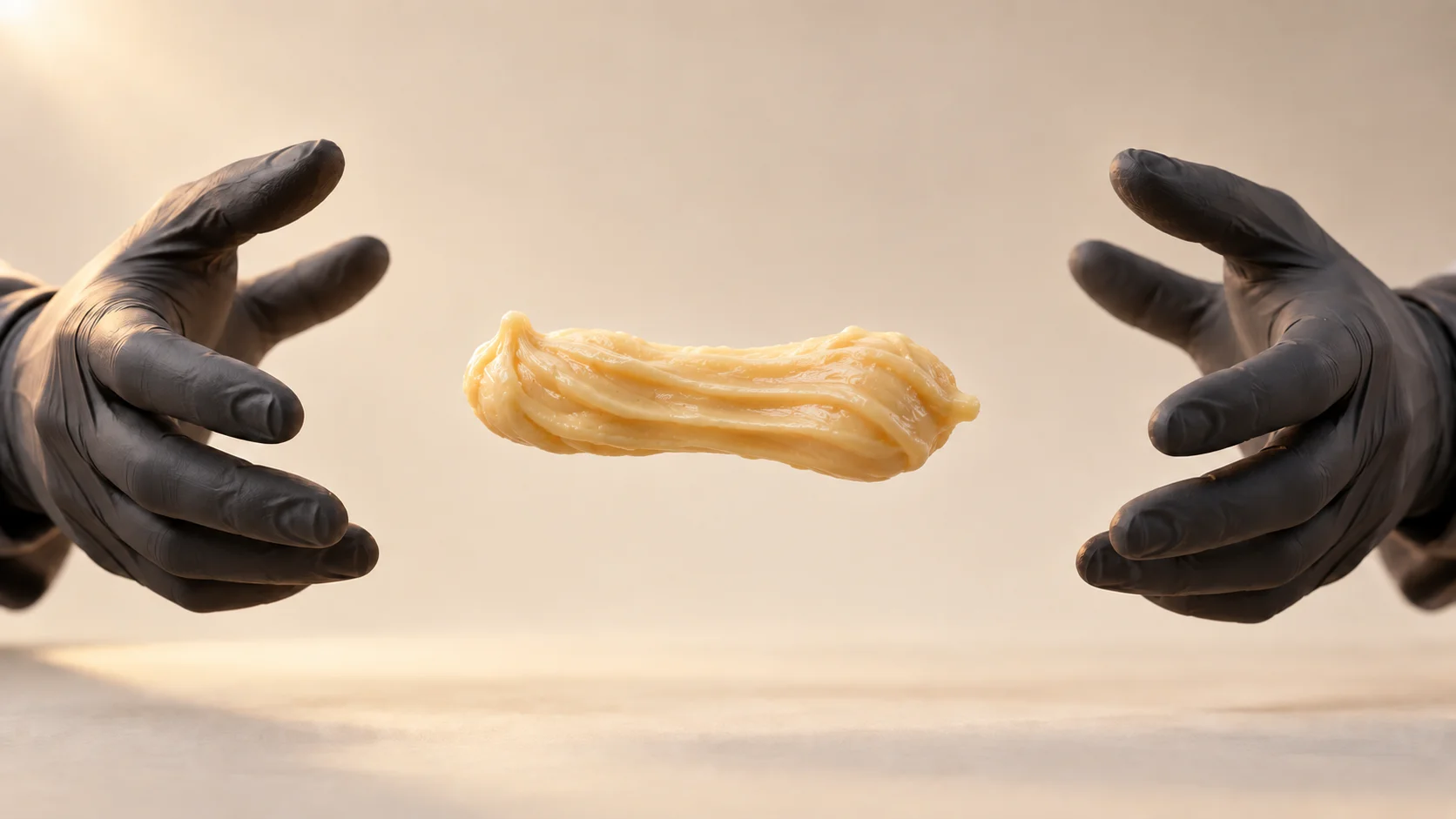
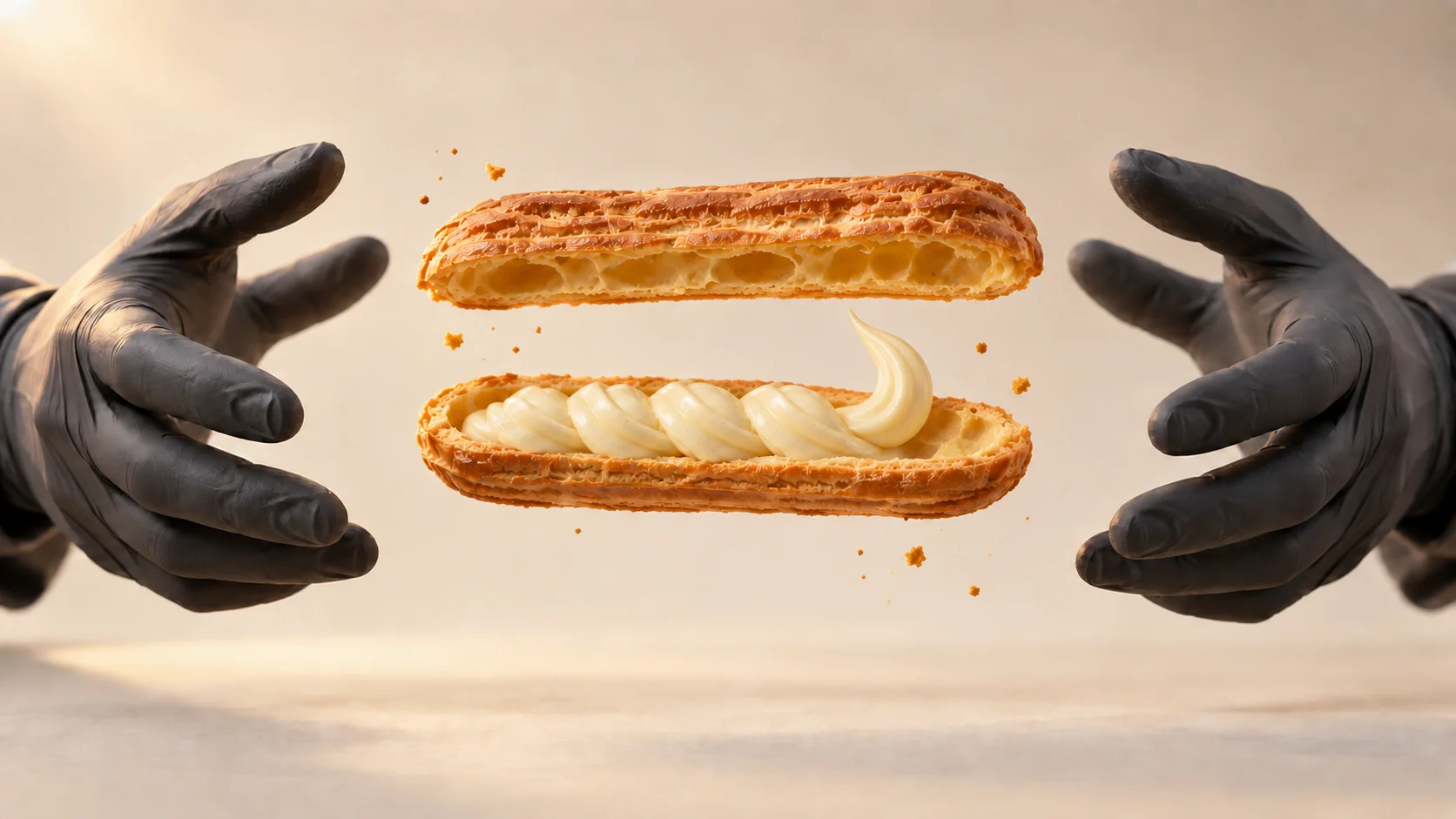
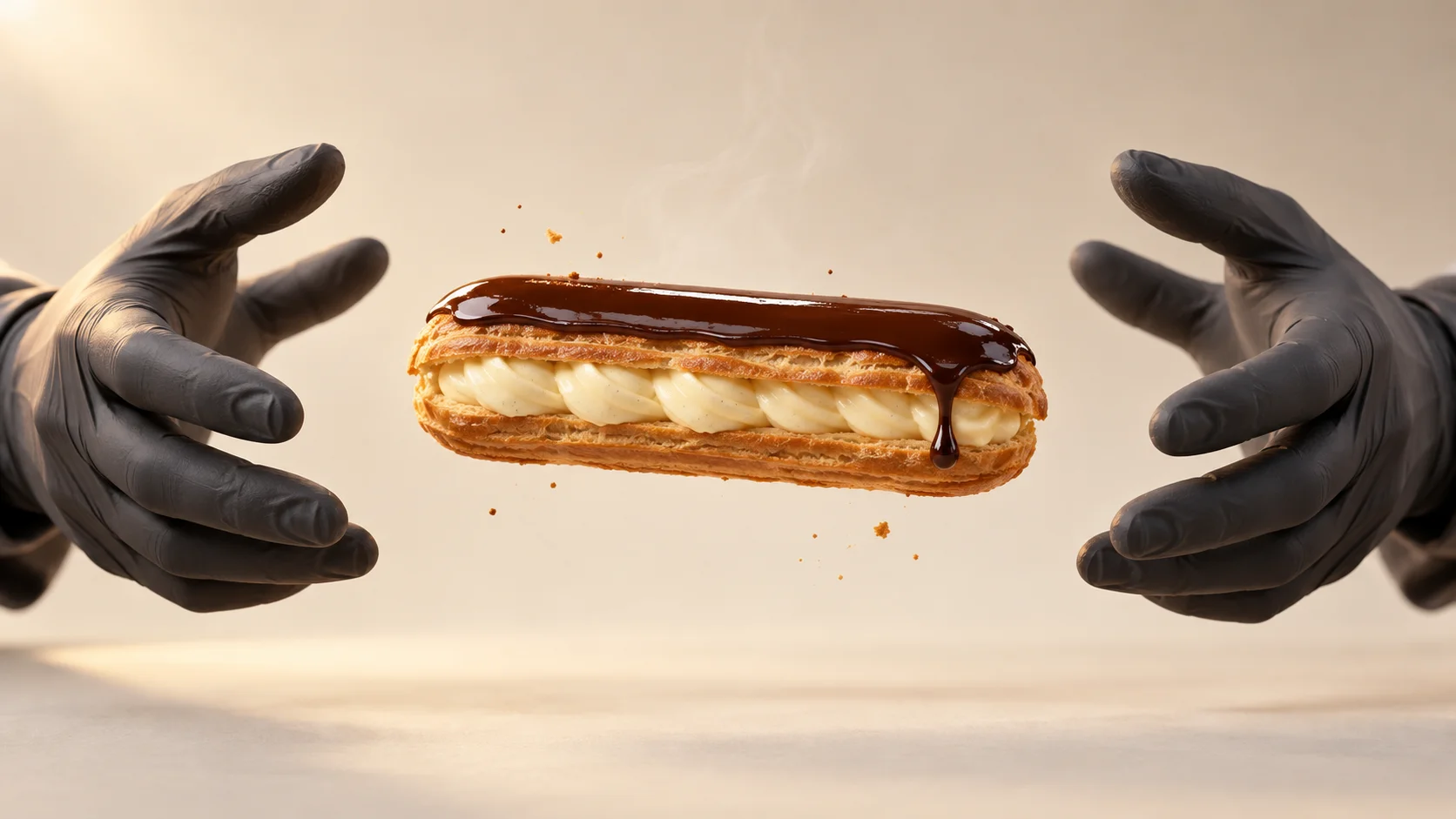
In our first intermediate image, the cream looked like it was flowing from the upper shell. We only corrected that part and left an empty space under the upper half. This is a good example of a correction worth making before animating the scene: a nice frame can have an error that becomes even more noticeable in motion.
Prompts to Create Your Own Three Frames
It is convenient to start with the finished product, as it determines the look that the advertisement must convey. Then edit this image to create a raw and open version. Save each approved state as a separate file; during editing, repeat which parts of the frame should remain the same.
Horizontal advertisement frame 16:9, realistic CGI of one French eclair floating in the center of a light cream studio. Golden, porous, and irregular choux pastry shell, visible strip of thick light vanilla cream, one smooth layer of dark chocolate on top, and only one heavy drop of glaze. Two hands in matte graphite gloves on the sides of the frame, clearly distanced from the product, without touching. Soft light from above left, warm edge, the entire dessert and both hands fit in the frame. No branding, text, second dessert, or light effects.
Include the approved image of the finished eclair. Keep exactly the same studio, light, camera position, frame, and those same two gloves. Change only the dessert to one portion of raw, moist choux pastry, slightly elongated horizontally, with delicate grooves. There is no cream, chocolate, or steam yet. The hands remain on their sides and do not touch the dough.
Include the approved image of the finished eclair as a style and scale reference. Keep the background, lighting, camera, and both distant hands. Instead of a closed dessert, show one baked golden shell split along into two halves: the empty upper half floats above the lower one, both showing a porous interior. In the lower half, thick light cream is arranged. Leave a clear empty space under the upper half; the cream must not flow from it. No glaze or additional products.
Storyboard: Ten Seconds Without Guessing
Break down the gesture, product reaction, and sound on the same timeline. The times below are a montage plan, not a guarantee that the model will execute each change frame by frame. If an important moment must fall exactly on a second, it is easier to set it in the editor after generating shorter shots.
| Time | Gesture and Image | Sound to Check |
|---|---|---|
| 0–1.5 s | Hands spread apart. One portion of raw dough elongates horizontally. | Quiet sticky movement of the dough, light rustle of gloves. |
| 1.5–3 s | The dough acquires elongated grooves; the right hand moves above it. | No “magic” sounds or transitions. |
| 3–4.5 s | Behind the hand, the dough grows and glistens. At the end, we see the flaky shell. | Gentle crack and short hiss of steam. |
| 4.5–6 s | Hands move vertically away from each other; the shell opens into two halves. | One dry crunch, a few quiet crumbs. |
| 6–7.5 s | Thick cream is arranged in the lower half. The upper remains clean. | Soft, short sound of cream being squeezed. |
| 7.5–9 s | The halves come together; dark glaze flows over the top. | Subtle, heavy movement of liquid, no loud splashes. |
| 9–10 s | Hands drop out of frame. The finished dessert remains still for a moment. | Short breath of silence at the end. |
In a vertical 9:16 version, move the hands closer to the lower corners and leave more space above the product. Do not reduce the eclair so much that the texture of the cream becomes invisible. Set the format in the tool; strings like --ar 9:16 are not a universal command for every interface.
The Simplest Way to Execute: Three Short Clips
In Higgsfield, select Video and the available Seedance variant. The official guide describes Seedance 2.5 as a model that accepts image references and generates sound with the image; available settings depend on the account and interface. Set the proportions, time, and resolution in the panel, and enter the action description into the prompt. The labels @Image 1 and @Image 2 in the examples below indicate the order of uploaded files; adjust them to the labels visible in your tool. Start with a cheaper preview or lower resolution if such an option is available. Higgsfield's guide recommends checking the entire clip and correcting one cause at a time.
Prepare three generations of about four seconds each. Take four seconds from the first, three from the second, and three from the third; combine them into a ten-second film. In each subsequent clip, use the approved last frame of the previous one as the starting image, if the selected mode supports it. Our three illustrations serve as references for stages and appearance, not three identical “first frames.” If the tool does not support multiple roles for images, send only the appropriate starting image and a short prompt for that clip.
@Image 1 is the exact first frame: one elongated portion of moist raw dough between two graphite gloves, warm light studio background. One continuous shot, about 4 seconds. Both hands move horizontally away, not touching the dough. The dough elongates and acquires elongated grooves. The right hand moves above the product; just behind its movement, the dough grows and transforms into a golden, porous eclair shell. The final frame holds one whole baked shell in the same place.
Fixed camera, the entire product and both hands in the frame, the same direction of light. No oven, extra hands, contact of fingers with food, teleportation, captions, music, or light effects. Short rustle of gloves and gentle crack of the shell.
@Image 1 is the approved last frame of clip 1: one golden eclair and the same hands. @Image 2 shows only the target appearance of the open shell and cream, without changing the background or scale. One continuous shot, about 4 seconds. The hands rise vertically from the dessert, still without touching. The shell splits along into the upper and lower halves; the upper remains above the lower, in the same axis. The interior is light and porous. One thick stream of light cream is arranged exclusively in the lower half. The end of the clip: two halves still open, cream in the lower.
Do not add a second eclair or a third half. The cream does not flow from the upper shell, does not pass through it, and does not spill into the air. Sound of one crunchy break and soft arrangement of cream; no music or transition sounds.
@Image 1 is the approved last frame of clip 2: open eclair with cream in the lower half. @Image 2 is the appearance of the finished product: golden shell, visible cream, and one layer of dark chocolate. One continuous shot, about 4 seconds. The hands move towards each other but maintain a visible distance from the dessert. The upper half descends onto the cream and fits onto the lower. Dark chocolate appears above and flows over the top surface into one smooth glaze; at the end, one small drop forms. The hands drop out of frame, and the finished eclair remains visible and still at the end.
No chocolate under the shell, no additional product, no change in the number of fingers, and no sudden cuts. Fixed light, background, and camera position. Quiet flowing sound of glaze, then a moment of silence.
When editing, compare the last frame with the first frame of the next segment: the length of the eclair, the position of the hands, and the brightness of the background should match. If the jump is noticeable, choose a different cutting point or regenerate just that segment. Check the sound separately: if the generated effects do not match the image, mute them and add your own licensed foley recordings in the editor.
Ambitious Variant: One Prompt for a Full 10 Seconds
According to the producer, Seedance 2.5 can generate longer clips and use multiple references, but the time limit alone does not guarantee the correct order of the seven transformations. The prompt below should be treated as an experiment. If the result loses shell halves or turns cream into glaze, return to shorter clips.
@Image 1 establishes the first frame and the appearance of the raw dough. @Image 2 establishes the appearance of the open golden shell and cream. @Image 3 establishes the appearance of the finished dessert, the color of the chocolate, and the lighting of the finale. All images show the same one eclair, the same two graphite gloves, and the same light cream studio. Do not treat the three images as three products at once.
Create a ten-second CGI film 16:9, one fixed shot from close distance. Two hands remain on the left and right sides of the image throughout, hovering at a visible distance from the dessert and never touching it. 0–1.5 s: hands spread apart, one raw portion of dough elongates. 1.5–3 s: elongated grooves form on the surface. 3–4.5 s: the right hand moves above the dessert; the dough grows and glistens into one baked shell. 4.5–6 s: hands move vertically apart, the shell opens into two equal halves, the upper remains above the lower. 6–7.5 s: thick light cream is arranged exclusively in the lower half. 7.5–9 s: the halves come together, and dark chocolate covers only the top. 9–10 s: hands leave the frame, the finished eclair remains on screen.
The same size and direction of the product throughout the film. Consistent number of fingers, realistic textures of the dough, flaky pores, cream density, and weight of the glaze. Soft light from above left, warm edge, consistent light cream background. Sound: light rustle of gloves, quiet crack of the shell, soft movement of cream and glaze, silence at the last moment. No music, narration, captions, logos, additional desserts, magical rays, or montage transitions.
What to Improve When the Result Looks Artificial?
| Problem | First Check | One Specific Fix |
|---|---|---|
| Glove touches the dough. | Is there a gap and whole fingers visible in the starting image? | Move the hands in the reference; add “visible gap throughout the scene” in the prompt. |
| Eclair changes length or there are two of them. | Does each reference image show one product at the same scale? | Use the last approved frame of the previous shot as the start of the next. |
| Cream appears above the shell or in the air. | Does the intermediate image correctly show the lower and upper halves? | Generate a separate frame with cream only in the lower half. |
| Appearance is plastic. | Does the shell have tiny pores, cracks, and an irregular edge? | Replace general “photorealistic” with a description of specific texture and soft light. |
| Too much happens at once. | Can the order of gestures be read without pause? | Separate baking, cream, and glaze into individual short clips. |
| Sound sounds like a computer game. | Do you hear unwanted “whoosh” or magical spark? | Turn off or mute generated audio and edit subtle foley manually. |
Before publishing, watch the clip at normal speed, then pause it at the baking, opening of the shell, entry of cream, and glazing. Also watch without sound: if the order of transformation ceases to be clear, audio effects will not fix it. If you are showing a real product from a company, compare the color, shape, and decoration with its photos; our illustrations depict a fictional dessert.
How to Transfer This Idea to Another Product?
Keep the structure of the advertisement–the initial state, one clear gesture, transformation, material detail, and finale–but rewrite the physics for the new product. A profiterole will be round and can open like a small shell. A croissant rises in layers, so show the flakiness, not an empty chamber like in choux pastry. For a cosmetic product, instead of baking, describe the combination of materials and flow of liquid. It is not enough to just replace the word “eclair” in the prompt with another name.
If you are preparing a whole campaign, our guide on perfume advertisement storyboarding and guide on product cards and other references will be useful. For decisions on how much dessert and how many hands to fit in the frame, also see explanation of framing and focal lengths.
Comments (0)
No comments yet. Be the first!